We build a game that measures how fast you react. The LED turns on at a random moment, and you have to press the button as soon as it lights up. The Arduino measures your reaction time in milliseconds and keeps your best score. If you press before the LED lights up, the buzzer warns you that you were too early. It’s perfect for racing your friends in class.
Age group: 10 and up
Level: Beginner
Time: About 40 minutes
What you will learn: measuring time with millis(), making random numbers with random(), the while loop, keeping a score in a variable
Parts list
Part
Qty
Arduino Uno (or compatible)
1
LED (red or green)
1
220 Ω resistor
1
Push button
1
Passive buzzer
1
Breadboard
1
Male-to-male jumper wires
~8
USB cable
1
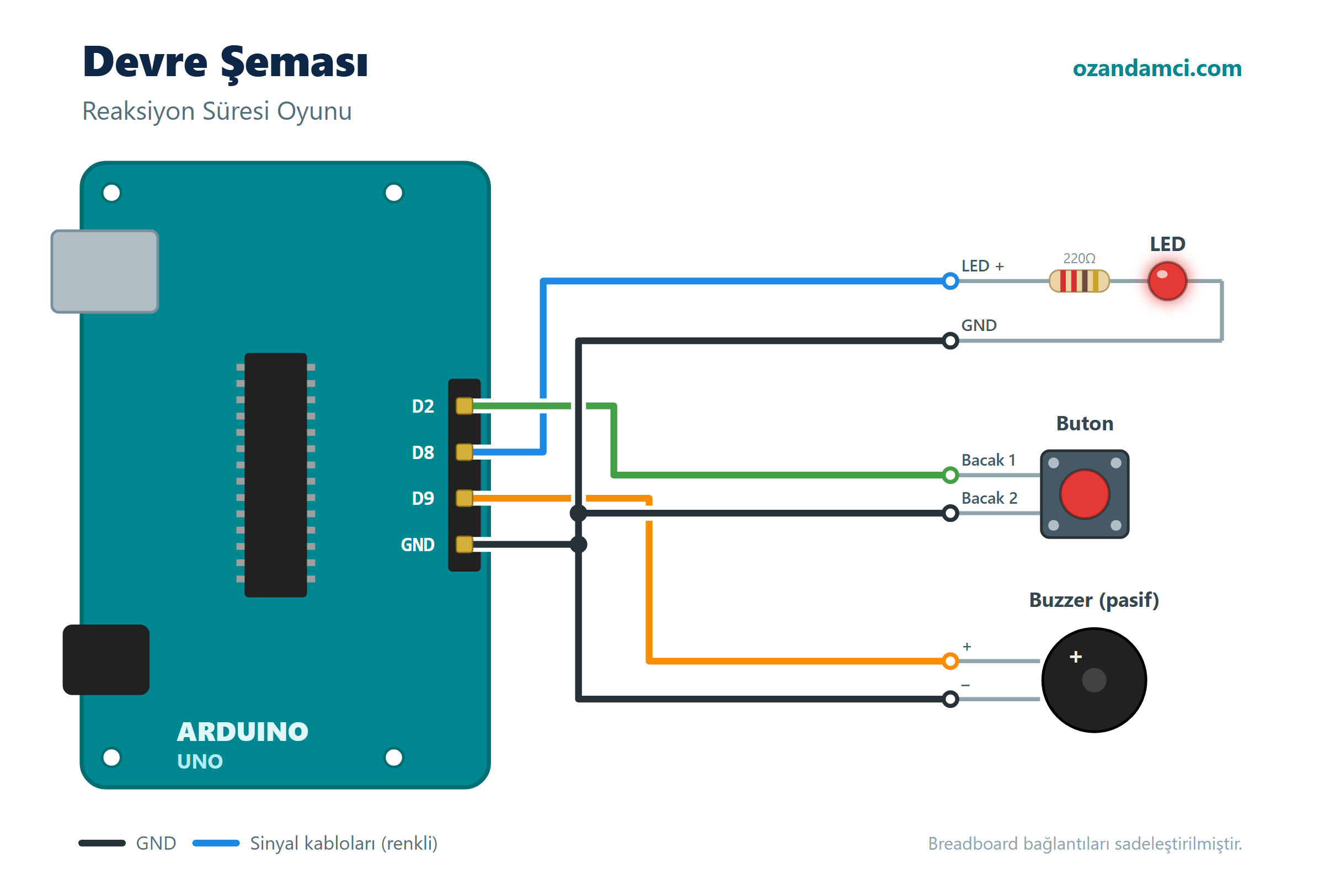
Wiring
Component
Connection
Arduino pin
LED
Long leg (through 220 Ω)
D8
LED
Short leg
GND
Button
One leg
D2
Button
Diagonally opposite leg
GND
Buzzer
+ (long leg)
D9
Buzzer
–
GND
Code
// Arduino Reaction Time Game - ozandamci.com

const int ledPin = 8;
const int buttonPin = 2;
const int buzzerPin = 9;

unsigned long bestScore = 0; // 0 = no score yet

void setup() {
  pinMode(ledPin, OUTPUT);
  pinMode(buttonPin, INPUT_PULLUP);
  pinMode(buzzerPin, OUTPUT);
  Serial.begin(9600);
  randomSeed(analogRead(A0)); // take randomness from an unused pin
  Serial.println("Welcome to the reaction game!");
}

void loop() {
  Serial.println("Get ready... press the button when the LED lights up!");

  // Wait a random 2-5 seconds and catch early presses meanwhile
  unsigned long waitTime = random(2000, 5000);
  unsigned long start = millis();
  while (millis() - start < waitTime) {
    if (digitalRead(buttonPin) == LOW) {
      Serial.println("Too early! Try again.");
      tone(buzzerPin, 200, 600);
      delay(2000);
      return; // start loop() again
    }
  }

  // Turn on the LED and start timing
  digitalWrite(ledPin, HIGH);
  unsigned long lightOnTime = millis();

  while (digitalRead(buttonPin) == HIGH) {
    // wait for the button to be pressed
  }

  unsigned long reaction = millis() - lightOnTime;
  digitalWrite(ledPin, LOW);
  tone(buzzerPin, 1500, 100);

  Serial.print("Your reaction time: ");
  Serial.print(reaction);
  Serial.println(" ms");

  if (bestScore == 0 || reaction < bestScore) {
    bestScore = reaction;
    Serial.println("New record!");
  }
  Serial.print("Best score: ");
  Serial.print(bestScore);
  Serial.println(" ms");
  Serial.println("-----------------------");

  while (digitalRead(buttonPin) == LOW) {
    // wait for the button to be released
  }
  delay(2000);
}
Step-by-step instructions
Place the LED. Connect a 220 Ω resistor to the long leg of the LED and wire it to D8; connect the short leg to GND.
Place the button. Put the button across the gap in the middle of the breadboard. Connect one leg to D2 and the diagonally opposite leg to GND.
Place the buzzer. Connect its long leg to D9 and its short leg to GND.
Upload the code. Choose your board and port, then click Upload.
Start the game. Open Tools → Serial Monitor (9600 baud). When you see “Get ready”, watch the LED and press the button as soon as it lights up.
Race each other. Take turns with a few people and see who gets the best score. The average human reaction time is around 200–300 ms.
Troubleshooting
It says “Too early” before the LED lights up: The button legs may be placed wrongly; make sure you are using diagonally opposite legs.
The Serial Monitor shows strange characters: Set the speed in the bottom-right corner of the Serial Monitor to 9600 baud.
Try it yourself
Make a two-player duel mode with two buttons and two LEDs: whoever presses first gets their LED lit.
Show the score on an I2C LCD display so you don’t need a computer.



Birisi “Arduino Reaction Time Game (Parts List and Code)” üzerinde düşündü