
What does this project do?
We build a night light that turns on by itself as the room gets darker and turns off as it gets brighter. A light-dependent resistor (LDR) measures the light in the room, and the Arduino sets the LED brightness to match. When the room is completely dark, the LED shines at full brightness.
- Age group: 9 and up
- Level: Beginner
- Time: About 30 minutes
- What you will learn: reading an analog sensor, using
map()andconstrain(), dimming an LED with PWM
Parts list
| Part | Qty |
|---|---|
| Arduino Uno (or compatible) | 1 |
| LDR (light-dependent resistor) | 1 |
| 10 kΩ resistor | 1 |
| White or yellow LED | 1 |
| 220 Ω resistor | 1 |
| Breadboard | 1 |
| Male-to-male jumper wires | ~8 |
| USB cable | 1 |
Wiring
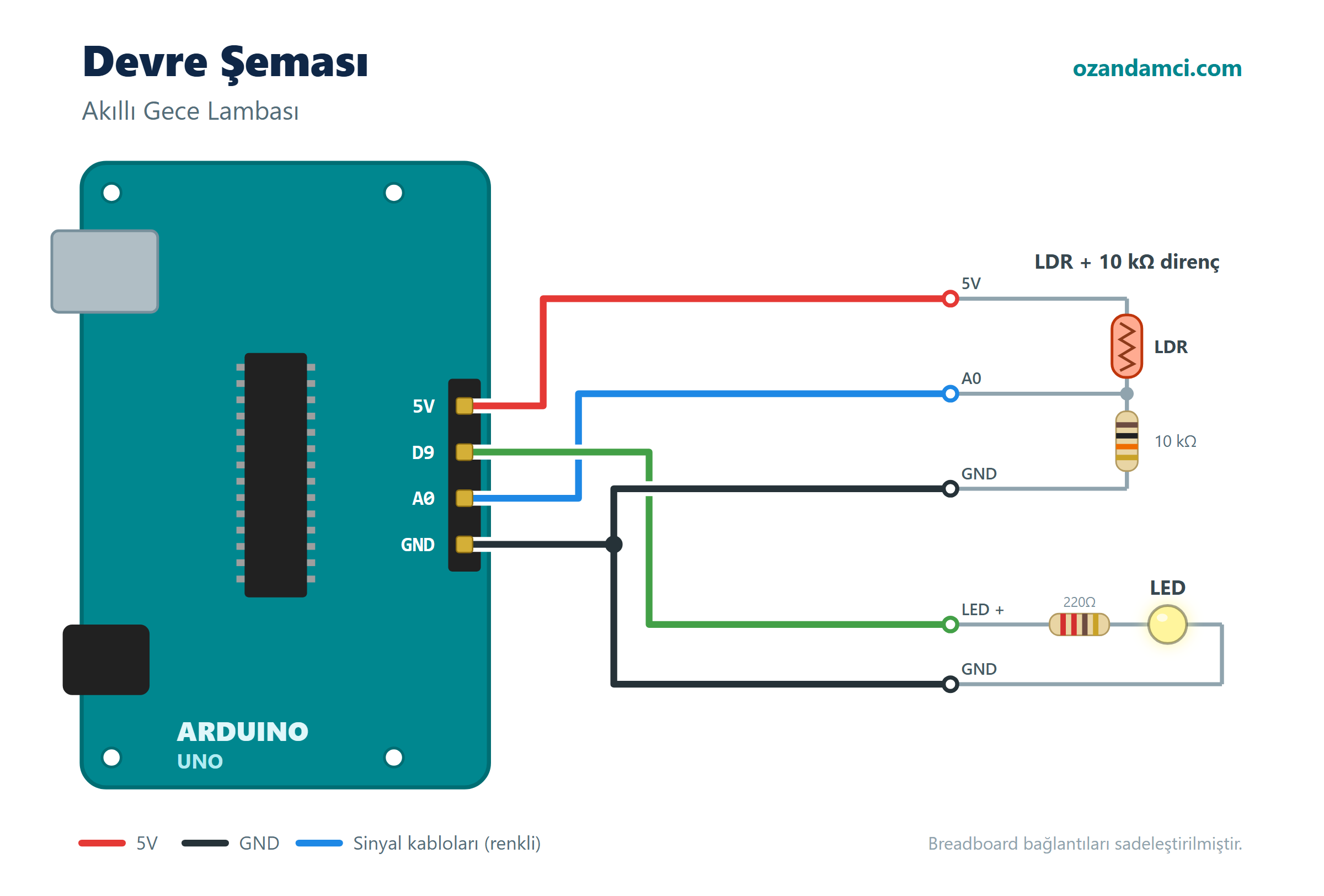
| Component | Connection | Arduino pin |
|---|---|---|
| LDR | One leg | 5V |
| LDR | Other leg | A0 |
| 10 kΩ resistor | Between A0 and GND | A0 / GND |
| LED | Long leg (through 220 Ω) | D9 |
| LED | Short leg | GND |
The LDR and the 10 kΩ resistor together form a voltage divider. The more light there is, the higher the value on A0.
Code
// Arduino Automatic Night Light - ozandamci.com

const int ldrPin = A0;
const int ledPin = 9;   // PWM pin (marked with ~)

// Adjust these for your own room (check the values in the Serial Monitor)
const int darkValue = 200;    // below this is "completely dark"
const int brightValue = 700;  // above this is "bright enough"

void setup() {
  pinMode(ledPin, OUTPUT);
  Serial.begin(9600);
}

void loop() {
  int light = analogRead(ldrPin);   // 0 - 1023
  Serial.print("Light: ");
  Serial.println(light);

  // Keep the value within the limits, then invert it into a brightness level
  int limited = constrain(light, darkValue, brightValue);
  int brightness = map(limited, darkValue, brightValue, 255, 0);

  analogWrite(ledPin, brightness);
  delay(100);
}
Step-by-step instructions
- Place the LDR. Put the LDR on the breadboard. Connect one leg to the Arduino’s 5V pin.
- Build the voltage divider. Connect the other leg of the LDR to A0. Put the 10 kΩ resistor at the same point and connect its other end to GND.
- Place the LED. Connect a 220 Ω resistor to the long leg of the LED and wire it to D9; connect the short leg to GND.
- Upload the code. In the Arduino IDE, choose your board and port, then click Upload.
- Calibrate. Open Tools → Serial Monitor. Write down the value in normal room light and the value when you cover the LDR with your hand. Put these two numbers into
brightValueanddarkValuein the code and upload it again. - Test it. Slowly cover the LDR with your hand. The LED should get brighter and brighter.
Troubleshooting
- The LED is always fully on or always dim: The calibration values may not suit your room; repeat step 5.
- It works backwards (lights up in bright light): The LDR and the 10 kΩ resistor have been swapped; the LDR must be on the 5V side.
Try it yourself
- Use an RGB LED instead and make a lamp that changes colour in the dark.
- Put the lamp inside a cardboard or 3D-printed box.


Birisi “Arduino Automatic Night Light with LDR Light Sensor (Parts List and Code)” üzerinde düşündü